Rollcaster for Windows, macOS & Linux

Real dice, virtually anywhere.

Roll your own dice into your own tray. Rollcaster watches from above, reads every die the moment it settles, and shares the result with your table — across the room or across the world.

Download Rollcaster

Version 0.4.6 · Windows, macOS & Linux · released

New to Rollcaster? See how it works · Getting started guide

Download

Two editions. Pick the one that matches how you play — everyone in a shared session can use either.

For the player with the dice tray

Rollcaster Version 0.4.6

Watches your tray through an overhead camera, reads every roll the moment the dice settle, and shares the result with your table.

  • Windows64-bit · installer (.exe)
    202.5 MB

    Windows may say it “protected your PC” — our installer is not yet recognised by Microsoft SmartScreen. Click More info, then Run anyway.

    SHA-25645333856cc51df22f55dbc52e35f5b2558d095d935f1efdb2aeb65f6e03f7939
  • macOSApple Silicon (M1 or newer) · disk image (.dmg)
    460.4 MB

    Open the .dmg and drag Rollcaster into Applications. It is signed and notarized by Apple, so it opens normally.

    SHA-256af31ac5c9a83b7b7ec804cf0faeab191a305bc1027a2124538aa53b5a8d84e7e
  • LinuxDebian / Ubuntu, 64-bit · package (.deb)
    461.8 MB

    Install with sudo apt install ./<file>.deb.

    SHA-256d6f894f3566f628ccf4afafd0fe513538918abf42365ef125d8e02a79944204c
For everyone else at the table

Rollcaster Eye Version 0.4.6

Watch a shared session’s rolls land live — no camera, no dice tray, nothing to set up. A small download.

  • Windows64-bit · installer (.exe)
    20.6 MB

    Windows may say it “protected your PC” — our installer is not yet recognised by Microsoft SmartScreen. Click More info, then Run anyway.

    SHA-256ce492afccfc779cf58f83e4b9ccc86da7dd20a3e14e7fc38630e62778cdc4a60
  • macOSApple Silicon (M1 or newer) · disk image (.dmg)
    37.6 MB

    Open the .dmg and drag Rollcaster into Applications. It is signed and notarized by Apple, so it opens normally.

    SHA-2569df5b045c047e2504ea10eb743813a3eeabb5c4f415f478a35fbde075d10fdaa
  • LinuxDebian / Ubuntu, 64-bit · package (.deb)
    49.3 MB

    Install with sudo apt install ./<file>.deb.

    SHA-256aa7ec0be05967d4e163bc0c072a6f9121d3b3d760b2003eefffdae516f2bb17d

Installing

Windows

Run the installer. If Windows says it “protected your PC”, click More info, then Run anyway — our installer just isn’t recognised by Microsoft SmartScreen yet.

macOS

Open the .dmg and drag Rollcaster into Applications. The first time, macOS asks whether Rollcaster may use the camera — click Allow. Needs a Mac with Apple Silicon (M1 or newer).

Linux

Install the package with sudo apt install ./<file>.deb. To let Rollcaster use your camera, run sudo usermod -aG video $USER once, then log out and back in.

Updating? Just install the new version over the old one — your settings and dice sets are kept. On Windows the installer removes the old version first; if it asks, leave Delete the application data unticked.

Then open Rollcaster: a short walkthrough sets everything up. The getting started guide covers it step by step.

Previous releases (8 earlier versions)

Older builds, kept for anyone who needs to roll back. Most people want the latest version above.

Version 0.4.5 ·

Version 0.4.4 ·

Version 0.4.3 ·

Version 0.4.2 ·

Version 0.4.1 ·

Version 0.4.0 ·

Version 0.3.0 ·

Version 0.2.1 ·

  • Rollcaster for Windows 230.4 MB
    SHA-2568ae065cf2fe78888ccacb185e2ea4924b272ac1a266ef68068affefd56813fcc
  • Rollcaster for macOS 379.4 MB
    SHA-256d0a44e39418d24afb9896d017687fe0aa986a3b6ff9241cfbb5b45c602a16977
  • Rollcaster for Linux 460.1 MB
    SHA-25698cf95de10a649e1849bc097d1789a4cad5f293abf4b49e58f1fb8e698333cc7
Recognition models (advanced)

Rollcaster downloads and verifies these by itself the first time it runs, and whenever a newer one is published. You don’t need to download them. They are listed for transparency and for offline installs.

  • pack-11.zip 40.1 MB ·
    SHA-2567387b7d501361ccae333b5749739d67383677910adf2bfb941a99c9390c572c4
  • pack-7.zip 38.2 MB ·
    SHA-256aac4e632a4c01e64cece3a435f13a103b3c94dfcb5eb6b121a7ad38241120e8c
  • pack-2.zip 32.4 MB ·
    SHA-25656bec4afee660e74103d468d7180d58ba590ff0e160bbe5dd31cdc2d1f76b93a
  • pack-1.zip 32.4 MB ·
    SHA-256f89a5e0903a759f1a06b2461b3fca833dbc869413082ff29ce38d8e66f015f1c
Check that your download is genuine (optional)

Every file lists a SHA-256 fingerprint. To check yours, compute it and compare it with the one shown here — they should match exactly.

  • Windows (PowerShell): Get-FileHash <file>
  • macOS / Linux (Terminal): shasum -a 256 <file>

Dice packs

Rollcaster reads everyday dice out of the box. A dice pack teaches it one particular set — swirls, glitter, low-contrast numbers and all — from hundreds of real rolls of those exact dice. Every pack here has been checked by the Rollcaster team.

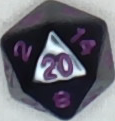
  • A d20 from the Black Solid, Purple Nums set, showing 20

    Black Solid, Purple Nums

    BSPNSolid✓ Validated

    Low contrast, but solid

    Deep-trained · 1,481 real rolls · shared by Jyra - RC

    • d4Moderate
    • d6Excellent
    • d8Excellent
    • d10Superb
    • d12Superb
    • d20Superb
    61.4 MB
    SHA-2560458c3c12c895b935e7660e9a7ffa8bd0ed62863508be7f0ac0facd8dd995c9b
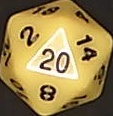
  • A d20 from the Yellow Solid, black text set, showing 20

    Yellow Solid, black text

    YSBTSolid✓ Validated

    solid yellow and black numbers

    Deep-trained · 1,461 real rolls · shared by Community Contributor

    • d4Moderate
    • d6Excellent
    • d8Excellent
    • d10Good
    • d12Superb
    • d20Excellent
    36.9 MB
    SHA-256f417ee1f23619de09d48092ee90866ffc695b9654f3200a296bcfff0e13621fa
What do the ratings mean?

Each die in a pack is rated on how reliably Rollcaster reads it correctly, without needing to ask you. The ratings are the same ones the app shows, and they’re deliberately cautious: each one is the level we’re confident the dice reach, tested on rolls the pack wasn’t trained on. A die tested on only a few rolls rates lower until more are recorded, even if it read every one of them right.

Superb: at least 97% · Excellent: 93% · Very good: 85% · Good: 70% · Moderate: 50% · Poor: below that.

Using a dice pack

  1. Download the pack that matches your dice.
  2. In Rollcaster, open the Train screen and find Enrollments.
  3. Choose + Import an enrollment pack and pick the file.

That’s it — Rollcaster checks the pack, adds it, and starts using it on your very next roll.

Need a hand?

Troubleshooting and the full setup guide now live on rollcaster.net.